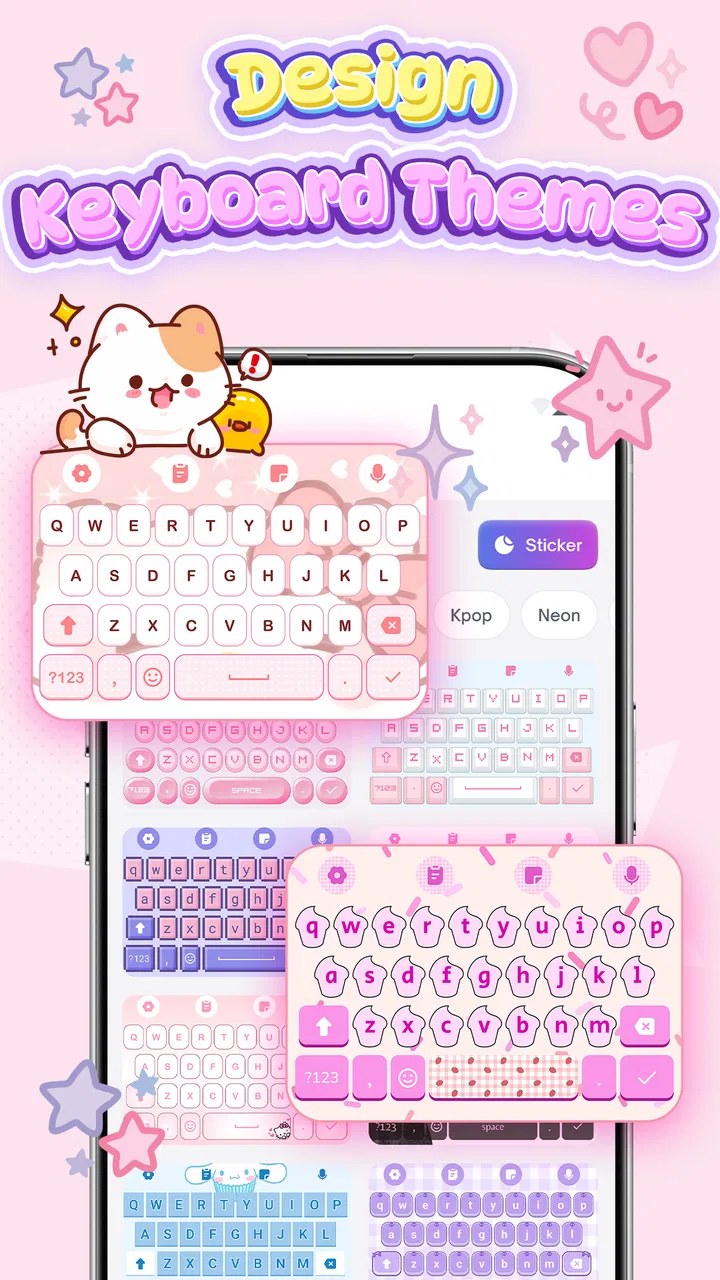
Keyboard Themes: Emoji Fonts
- 4.5
- Rating
- 5.00M
- Installs
- Free
- Price

 Analysis by App-foxy
I tried Keyboard Themes: Emoji Fonts as a personalization app rather than treating it like a simple wallpaper picker, and that distinction matters. Its purpose is to make everyday typing feel more personal through keyboard themes, fonts, emojis, and cute visual styles. That sounds small, but the keyboard is one of the parts of a phone I use constantly, so even a modest change can affect how messages, searches, notes, and social posts feel.
The app is made by FunGear inc and is free to install, with optional purchases priced from $4.99 to $20.99 per item. It is rated for Everyone, supports devices running Android 8.0 or later, and the current version is 1.2.6. I found it most appealing for people who enjoy changing the look of their phone without replacing the entire launcher or committing to a complicated customization system.
My overall impression is positive, but not blindly enthusiastic. The visual side is the main attraction, while the practical experience depends on how much control you want over your keyboard and how comfortable everyone sharing a device is with the same appearance. It works best when customization is the goal, not when you are looking for a full productivity keyboard with advanced writing tools.
You May Also Like

 Blood Strike: 2.5 Anniversary
Blood Strike’s Loadouts Turn Every Drop Into a Tactical Gamble
A close look at Blood Strike’s custom loadouts: how fast access to signature weapons reshapes its battle royale rhythm, rewards preparation, and narrows the gap between fights.

 Pandora - Music & Podcasts
Pandora’s Music Is Easy to Start, but Harder to Recover
Pandora’s strength is its low-effort path from a seed to a station. Its weak spot is how much confidence it asks you to place in connection, setup, and quiet recovery.

 8 Ball Pool
 Is Built on Rivalries, Rematches, and Routine
A close look at the rivalries, rematches, shared routines, and unanswered safety questions that turn a quick pool match into a persistent mobile community.

 Samsung Music
’s Quiet Strength Is Playing What You Already Own
Its reach comes less from spectacle than from dependable access to a personal library. That simplicity is both the app’s strongest retention engine and its ceiling.

 AccuWeather: Weather Radar
AccuWeather Review: A Quick, Clear Forecast for Everyday Decisions
For everyday plans, the best forecast is the one you can understand quickly. AccuWeather makes rain timing, radar, and local conditions easy to act on, with a few trade-offs.

 Hill Climb Racing
Why Hill Climb Racing Still Turns Crashes Into One More Run
A tiny car, a bumpy hill and one more upgrade: Hill Climb Racing keeps resurfacing because its simple chaos makes every near-miss feel personal.
More From Our News Desk



How it feels on a shared household phone
A realistic use case is a household tablet or phone that moves between people. One person might prefer a soft, cute theme, another may want colorful emojis, and someone else may simply want a more readable font. A keyboard customization app can make the device feel less anonymous, especially for a teenager or a family member who uses messaging frequently.
That shared-device situation also exposes the app’s main practical trade-off: a keyboard appearance is usually a device-level choice, not a separate visual environment for every person. If two people use the same phone under the same setup, the selected theme may become part of the shared experience. The person who enjoys decorative fonts may be happy with that arrangement, while someone who values a plain, familiar keyboard may find it distracting.
I would therefore treat the first theme choice as a household conversation rather than a private decision. On a personal phone, you can experiment freely. On a shared device, it is better to choose a style that remains readable for everyone, particularly when the phone is used for school messages, appointments, directions, or quick searches as well as casual chatting.
The app’s strongest household use is not that it solves different user profiles; it is that it gives the group an easy visual way to make one device feel more welcoming. That is a narrower benefit, but it is a genuine one. A child may enjoy the playful look, while an adult may appreciate a calmer theme that still feels less ordinary than the default keyboard.
What I would check before changing the look
I recommend starting with the person who types the most on the device. This avoids a common annoyance: choosing a striking theme because it looks good in a preview, then discovering that the contrast, lettering, or decorative elements make longer messages tiring. A keyboard is viewed at close range and used repeatedly, so a design that seems charming for a minute may become irritating after several conversations.
I also separate appearance from typing habits. A new font or background can make the keyboard feel different even when the basic typing behavior has not changed. When testing a theme, I type a short message, a web address, a few numbers, and a sentence with punctuation. That quick check is more useful than judging the theme only from its visual presentation.
For a shared phone, I would test the keyboard in both bright and dim surroundings. A style that feels comfortable in daylight may be too busy at night, while a darker design may be harder for another household member to read. This is one of the less obvious decisions with a customization app: the best theme is not necessarily the most decorative one, but the one that stays usable across the moments when the device is actually passed around.
Setup boundaries and the everyday typing experience
Keyboard Themes: Emoji Fonts is best understood as a layer of personalization around typing. The appeal comes from selecting a visual identity for the keyboard rather than changing every part of the phone interface. That makes the idea approachable for someone who wants a visible difference without learning a large customization system.
At the same time, I would not install it expecting it to replace every feature of a dedicated keyboard app. The store positioning focuses on themes, fonts, emojis, and cute designs, so the reason to choose it is visual expression. If your priority is advanced text prediction, specialized multilingual tools, extensive gesture controls, or a highly configurable writing workflow, a more productivity-focused keyboard may suit you better.
The setup boundary is especially important on a device used by several people. Before settling on a design, I would confirm which keyboard is active, whether the selected appearance is visible in the apps each person uses, and whether the default keyboard can be restored easily if somebody dislikes the change. These are sensible checks whenever an app affects typing, because the keyboard sits between the user and almost every text field.
I also recommend keeping the first experiment simple. Choose one theme, use it for ordinary tasks, and only then explore more decorative options. Changing several visual elements at once makes it difficult to identify what caused a problem. If a font feels cramped, or an emoji style looks out of place in a work message, you want to know which choice to adjust rather than abandoning the entire app.
The free entry point helps with that cautious approach. You can begin without paying, see whether the visual change is worthwhile, and decide later whether an optional item is justified. The purchase range runs from $4.99 to $20.99 per item, so I would look carefully at what a paid selection adds before treating it as a casual impulse buy.
That pricing structure is a limitation for users who expect every style to be included after installation. The app can be enjoyable at no cost, but the presence of optional purchases means the most attractive design for one person may not be part of the free experience. In a household, this also creates a small coordination issue: agree on whether spending is appropriate before selecting a paid item, especially if the phone is used by younger family members.
Small workflow choices that improve the result
One useful habit is to keep a plain, readable option in mind as a fallback. Decorative keyboards are fun for casual messages, but a neutral style is often better for filling forms, writing longer notes, or handing the device to somebody who has not chosen the customization. Having a practical alternative prevents the app from becoming an all-or-nothing decision.
Another tip is to judge emojis in context rather than in isolation. A colorful emoji set can make personal chats more expressive, but the same visual style may feel unsuitable in a formal message. I would use the playful design as a way to add personality, not as a reason to make every conversation look the same.
Fonts deserve similar care. A distinctive typeface can make the keyboard look special, but legibility matters more than novelty. If a family member has trouble distinguishing characters, or if someone types quickly without looking closely at every key, a simpler font is the responsible choice. The app is at its best when the visual change supports comfort instead of competing with it.
Coordinating preferences without overcomplicating the phone
In my experience, the most successful shared-device setup comes from agreeing on a default rather than trying to satisfy every preference simultaneously. A household might choose a gentle theme for everyday use and let the person who owns a separate phone explore more expressive designs there. That keeps the common device predictable while still leaving room for individual taste.
This is also where the app’s category becomes clear. It is a personal expression tool, not a household management system. I would not choose it because I expect separate visual identities, detailed user profiles, or automatic switching between family members. Those expectations belong to account or device-management features, whereas this app is primarily about how the keyboard looks and feels.
For parents and children sharing a device, coordination should include the purchase question. Since the app is free with optional in-app items, a child may see a design they like and assume it is part of the normal customization process. I would explain which choices are free and which require approval, then let the child help select a suitable design within that boundary. That turns the app into a small, manageable personalization activity rather than an unexpected spending problem.
There is a practical advantage to involving everyone before the change: people are more likely to accept a theme they helped choose. If one person changes the keyboard without warning, another may interpret the new appearance as a malfunction. A quick explanation avoids confusion, especially for relatives who are comfortable using a phone but do not enjoy troubleshooting altered interfaces.
I also think about communication context. A cute keyboard can be a pleasant fit for family chats, creative messages, and social posts. It is less important when the device is mainly used for banking, work, navigation, or school administration. In those situations, a low-distraction theme is more sensible. The app does not need to dominate the phone to be worthwhile; a subtle change can deliver most of the benefit.
One non-obvious trade-off is that visual customization can create a false sense of personalization while leaving the actual typing workflow unchanged. If you want faster writing, fewer mistakes, or better support for a particular language, a themed appearance alone may not address the real problem. I would choose this app when I want the keyboard to look different, then evaluate a specialist keyboard separately if my frustration is about speed or accuracy.
Age context, trust, and sensible expectations
The Everyone age rating makes the app approachable for a broad audience, and the colorful focus is naturally attractive to younger users. Still, an age rating is not a substitute for household guidance. A child may understand how to select a theme without understanding that a keyboard is involved in everyday text entry, so an adult should help confirm that the chosen setup is comfortable and appropriate for the device’s users.
Trust matters because a keyboard is a sensitive part of phone use. I do not treat a visual keyboard app as automatically trustworthy simply because it is colorful or easy to use. Before relying on any keyboard-related tool, I would read the system prompts carefully, understand what is being enabled, and avoid rushing through setup. That is good practice for every keyboard application, particularly on a shared phone where not everyone can evaluate technical choices confidently.
I would also explain the difference between changing the keyboard’s appearance and changing the content of messages. Themes and fonts can alter presentation, but they do not make a message more private, more accurate, or more suitable for every audience. Younger users may enjoy the expressive side, while adults should set expectations about when playful styling is appropriate.
For older relatives, the priority may be the opposite. A decorative theme can make a phone feel friendly, but readability and familiarity should come first. If the new design makes keys harder to identify, I would switch to a simpler option or return to the usual keyboard. That is not a failure of the app; it is a reminder that personalization should adapt to the user rather than forcing the user to adapt to decoration.
My advice is to treat the app as a reversible experiment. Try it during ordinary use, ask each regular user whether typing feels comfortable, and keep the default option available in case the household changes its mind. This approach is especially useful when a device belongs to several people, because the most enthusiastic user is not always the person who depends on the keyboard for the most important tasks.
Who will enjoy it, and who should skip it?
I would recommend Keyboard Themes: Emoji Fonts to someone who wants a quick visual refresh and enjoys cute or expressive phone design. It is a good match for personal phones, casual messaging, and users who see the keyboard as part of their digital style. The free installation also makes it easy to test without committing immediately to a purchase.
I would be more cautious for people who use their keyboard mainly for work, long-form writing, accessibility-sensitive typing, or specialized language input. Those users may gain more from a keyboard built around accuracy and control than from one centered on appearance. The same applies to anyone who dislikes frequent visual changes or wants every household member to have a completely separate setup on one device.
It may also be the wrong choice if you are looking for a full phone makeover. The app’s appeal is concentrated around the keyboard, so it will not replace a launcher, icon pack, or broader system customization approach. That focused scope is a strength for someone who wants a small change, but a limitation for someone expecting the entire interface to match.
My household verdict after using the customization approach
I came away seeing Keyboard Themes: Emoji Fonts as a pleasant, focused personalization app rather than an essential replacement for a standard keyboard. Its value is easy to understand: it gives everyday typing a more individual look through themes, fonts, emojis, and playful designs. The experience is most satisfying when visual expression matters more than advanced writing tools.
The app has a strong audience among people who enjoy cute phone aesthetics, especially on a personal device. It can also work well in a household, provided everyone understands that a shared keyboard needs a shared compromise. Choose for readability first, agree on optional spending, and test the design in real messages instead of judging it only by appearance.
FunGear inc has kept the concept straightforward, and the app’s broad appeal is reflected in its 4.7 average from around 3.6 thousand ratings. It has also passed the half-million-install mark, which suggests that the idea resonates with many Android users. Those figures do not change my main advice: popularity is less important than whether the selected style remains comfortable for the people who actually type on the device.
My final recommendation is simple. Install it if your goal is to make the keyboard feel more like yours, and begin with a free, readable theme before considering optional purchases. Skip it if you need a feature-rich productivity keyboard, separate household profiles, or a complete interface transformation. The best reason to use it is not novelty alone, but a small visual change that makes everyday typing more enjoyable without getting in the way.
FAQs for Keyboard Themes: Emoji Fonts
01What features does Keyboard Themes: Emoji Fonts offer?
Keyboard Themes: Emoji Fonts provides a wide range of customizable keyboard themes, a vast collection of emojis, and diverse font options. Users can personalize their typing experience to match their mood or style, with easy-to-use settings for theme selection and font adjustments. It also supports multilingual typing.
02Is Keyboard Themes: Emoji Fonts free to use?
Keyboard Themes: Emoji Fonts is available for free download with basic features. However, it offers in-app purchases for premium themes and fonts. These purchases enhance the user experience by providing access to exclusive designs and advanced customization options, making it suitable for users looking for a more tailored experience.
03Does the app affect my device’s performance?
Keyboard Themes: Emoji Fonts is designed to be lightweight and efficient, minimizing any impact on your device's performance. It runs smoothly without causing any noticeable lag or battery drain. The app is optimized to work seamlessly across various Android and iOS devices, ensuring a stable and responsive typing experience.
04How secure is my data with Keyboard Themes: Emoji Fonts?
The app prioritizes user privacy and security, ensuring that personal data, including typed information, is not stored or shared. It adheres to strict privacy policies and employs encryption to protect user data. Users can confidently use the app without worrying about data breaches or unauthorized access.
05Can I use Keyboard Themes: Emoji Fonts with other apps?
Yes, Keyboard Themes: Emoji Fonts integrates seamlessly with all apps on your device, allowing you to use customized keyboards, emojis, and fonts across different platforms. Whether you're messaging, emailing, or posting on social media, the app ensures a consistent and personalized typing experience across all applications.
Pros
- Wide range of customizable themes available.
- Supports multiple languages seamlessly.
- Includes fun emojis and fonts for free.
- Smooth and responsive typing experience.
- Easy theme switching with intuitive interface.
Cons
- Some themes require in-app purchases.
- Occasional ads can be disruptive.
- Limited options for keyboard size adjustment.
- Battery consumption is slightly high.
- Not all emojis are compatible with older devices.

Keyboard Themes: Emoji Fonts
Gallery